AddItem.wws?sku=WCONNECT&Qty=1
ShoppingCart.wws
The shopping cart is arguably the most tricky portion of the wwStore application. The reason for this is that online orders are handled very differently than say a desktop Point of Sale system would handle orders. Users visit the site anonymously and only when they're ready to check out is an actual order placed. Until that time the order is entirely virtual.
The store handles this through creating phantom invoices that store their temporary lineitems in a separate table (wws_TLineItems) before save the final invoice which saves the lineitems into the 'real' lineitems table (wws_lineitems).
The shopping cart logic is also reused in a lot of different places. For example, you see the shopping cart before checking out, then again before making the final approval of your order and then again in the email confirmation and confirmation page. As you may have guessed by now the behavior of the shopping cart is wrapped up in the business object.
You can also reach the shopping cart from a number of different links:
- From an item page when you click Add Item
- From the Item Category List when you click Add
- From the HomePage when you click Checkout
All of them lead to a page like this:
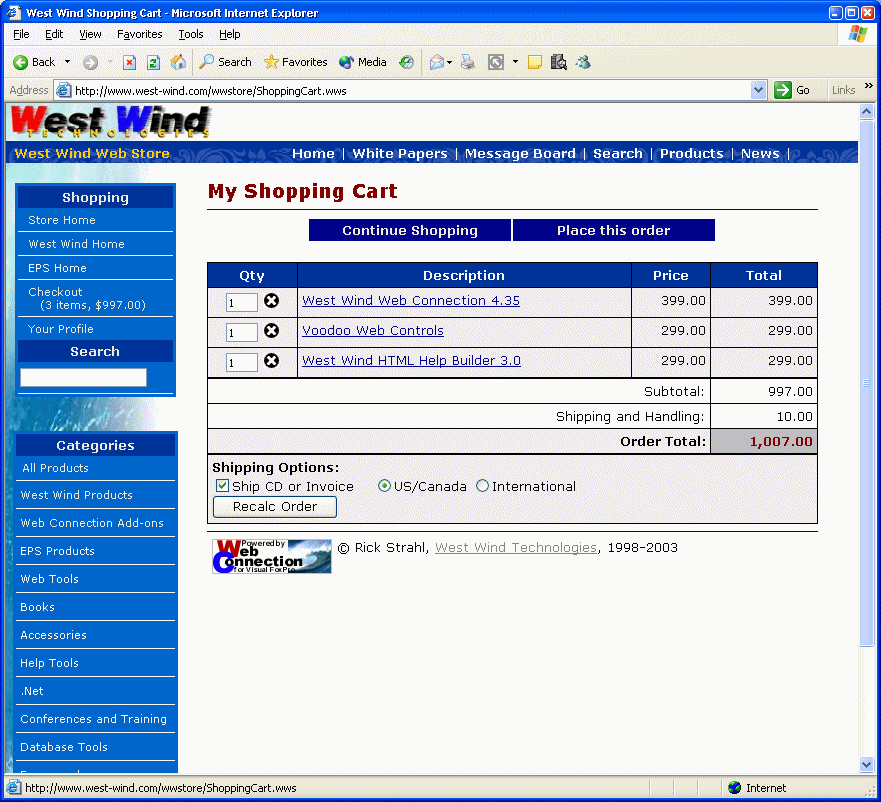
The most common way you'll end up at the Shoppingcart is by adding an item to the cart. A specific method called AddItem exists for this and this page (AddItem.wws) is called both from the Item and the Item Category page.
FUNCTION AddItem

Session.SetSessionVar("CookiesOn","True")

lcSKU = UPPER(Request.QueryString("Sku"))
IF EMPTY(lcSKU)
   THIS.ErrorMsg("Invalid Item","Invalid SKU. This item is unavailable at this time")
   RETURN
ENDIF

lnQty = VAL(Request.QueryString("qty"))
IF lnQty = 0
	lnQty = VAL(Request.Form("Qty"))
ENDIF
IF lnQty = 0
   lnQty = 1
ENDIF

IF lnQty < 0
   THIS.ShoppingCart("You can't subtract items from your order at this time. Please remove the item, then add it back.")
   RETURN
ENDIF
IF lnQty = 0
   THIS.ShoppingCart()
   RETURN
ENDIF

*** Retrieve a temporary Invoice PK either by creating
*** a new PK or retrieving it from the session
lcInvPK = Session.GetSessionVar("InvoicePK")
IF EMPTY(lcInvPK)
   loInv = CREATE([WWS_CLASS_INVOICE])
   #IF WWSTORE_USE_SQL_TABLES
   loInv.SetSQLObject(Server.owwStoreSQL)
   #ENDIF

   lnInvPK = loInv.CreateNewId()
   Session.SetSessionVar("InvoicePK",TRANS(lnInvPK))
ELSE
   lnInvPK = VAL(lcInvPK)
ENDIF

*** Item is Ok - now lets create a temporary lineitem basket
loLineItems = CREATE([WWS_CLASS_TLINEITEMS])

#IF WWSTORE_USE_SQL_TABLES
   loLineItems.SetSQLObject(Server.owwStoreSQL)
#ENDIF

IF !loLineItems.New()
   THIS.ErrorMsg("Unable to add lineitem",loLineItems.cErrorMsg)
   RETURN
ENDIF

*** And add the item to it... Generic Routine
*** Last parm 3: Add items as separate items for each sku
loItem = loLineItems.AddItem(lcSku,lnInvPk,lnQty,3)

IF ISNULL(loItem)
   THIS.ErrorMsg("Can't add item to cart",loLineItems.cErrorMsg)
   RETURN
ENDIF

*** Generic Type handler - reads all vars with a type prefix
*** and adds value to the XML properties field
*** adds extra text with the name of the 'property' minus the type prefix
*** Multiple values go on separate lines.
*** Example:  showAttendee -  Var: showAttendee, value: Rick Strahl, ExtraText: Attendee: Rick Strahl
IF !EMPTY(loItem.oData.Type)
   DIMENSION laVars[1,2]
   lnItems = Request.aFormVars(@laVars,loItem.oData.Type)
   FOR x=1 TO lnItems
       loItem.SetProperty(laVars[x,1],laVars[x,2])
       loItem.oData.ExtraText =  loItem.oData.ExtraText + ;
                                 "<br>" + STRTRANC(laVars[x,1],TRIM(loItem.oData.Type),"") + ": " + laVars[x,2]
   ENDFOR
ENDIF

IF ISNULL(loItem)
   THIS.ErrorMsg("Unable to add item to shopping cart",loLineItems.cErrorMsg)
   RETURN
ENDIF

*** Must save it to disk manually!
loItem.Save()

*** Redisplay the Shopping Cart
Response.Redirect("ShoppingCart.wws")
* THIS.ShoppingCart()
ENDFUNC
* wwStore :: AddItem
The method starts by getting the SKU and Qty selected and then checking to see if we created a virtual invoice previously. If not one is created and the PK of that invoice saved. This PK is what's used as the InvoicePK foreign PK in the lineitems table. Note the invoice is not physically created at this time - Save() is never actually called. All we need at this time is a PK for the invoice so our shopping cart knows which invoice the items belong to. The PK will be assigned to the final invoice we create when the user actually checks out.
The next thing that happens is that a new LineItems object is created. This object is used to add a new Linteitem to the table. Note the use of the New() method, followed by a call of the AddLineItem method which pulls an item out of inventory and creates a lineitem object from it. The object is passed back to you and you can manipulate the object with additional assignments to its oData member here. Finally the item is Saved and written to disk by calling the Save() method.
Now, to display the shopping cart we Redirect to the Shopping cart page. Although you could call the shopping cart page directly here, this is potentially confusing because the user sees a URL that says AddItem.wws instead of ShoppingCart.wws. This is problematic if the user decides to refresh the shopping cart - a refresh would add another item in this scenario. Using a Redirect instead makes sure that the user gets to the shopping cart with the right URL. Note that this causes two hits to occur on the server: One of the AddItem and one for the shopping cart so this is definitely less efficient than just calling the Shoppingcart method. In high volume apps you might just do This.ShoppingCart() instead of the Redirect().
wwStore::ShoppingCart
The shopping cart method is a bit more complex. This method has to deal with a lot of things. If you look closely at the figure at the top you'll see that it has options for changing shipping options (US/Foreign), shipping a CD (physical shipment as opposed to electronic delivery), and it also allows for changing the quantities of each of the items.
FUNCTION ShoppingCart
PARAMETER pcErrorMsg
PRIVATE pcShoppingCart, plNoItems
LOCAL x, lcButton, lcForeign, lcShipDisks, lnInvPk, loInv, ;
      oLineItems, loRow, lcSkuQty

*** Make sure Cookies are on before proceeding!!!
IF EMPTY(THIS.oSession.GetSessionVar("CookiesOn"))
   THIS.CookieWarning()
   RETURN
ENDIF

IF VARTYPE(pcErrorMsg) # "C"
   pcErrorMsg = ""
ENDIF

lcButton = Request.Form("btnSubmit")

*** Deal with the Shipping Flags
*** this is kinda twisted because we may not have customer
*** info at this point in the order process - so we
*** grab and store Foreign and ShipDisks values in a Session
lcForeign = Request.Form("Foreign")
IF lcButton="Recalc"
   IF EMPTY(lcForeign)
      lcForeign = "Off"
   ENDIF
   Session.SetSessionVar("Foreign",lcForeign)
ELSE
   lcForeign = Session.GetSessionVar("Foreign")
   IF EMPTY(lcForeign)
     lcForeign = "Off"
   ENDIF
ENDIF

lcShipDisks = Request.Form("ShipDisks")
IF lcButton = "Recalc"
   IF EMPTY(lcShipDisks)
      lcShipDisks = "Off"
   ENDIF
   Session.SetSessionVar("ShipDisks",lcShipDisks)
ELSE
   lcShipDisks = Session.GetSessionVar("ShipDisks")
ENDIF

lnInvPk = VAL( Session.GetSessionVar("InvoicePK") )

*** Now load the line items
oLineItems = CREATE([WWS_CLASS_TLINEITEMS])
#IF WWSTORE_USE_SQL_TABLES
oLineItems.SetSQLObject(Server.owwStoreSQL)
#ENDIF

oLineItems.LoadLineItems(lnInvPK,1)

*** Create a temp invoice so we can total everything
loInv = CREATE([WWS_CLASS_INVOICE])
#IF WWSTORE_USE_SQL_TABLES
loInv.SetSQLObject(Server.owwStoreSQL)
#ENDIF
loInv.New()  && Create Temporary Invoice Object

*** IF we already have a temporary invoice number use it
IF !EMPTY(lnInvPK)
   loInv.oData.PK = lnInvPK  && Assign existing invoice Pk to it
ENDIF

*** And assign the lineitems to it
loInv.oLineItems = oLineItems  && loItems

*** Update shipping flags used when calculating totals
IF lcForeign = "True"
   *** Dummy foreign country set on empty Cust record
   loInv.oCustomer.oData.CountryID = "MX"
ENDIF
loInv.oData.ShipDisks = (lcShipDisks="On")

*** check for Item Qty changes (Recalc)
IF lcButton = "Recalc"
	FOR x=1 to oLineItems.nCount
	  loRow = oLineItems.aRows[x]

	  *** Update Qtys if changed on the Web Page!
	  lcSkuQty = Request.Form("SKU_" + TRIM(loRow.Sku))
	  IF !EMPTY(lcSkuQty)
	     *** Update the current display array
	     loRow.Qty = val(lcSkuQty)
	     IF loRow.Qty < 0
	        loRow.Qty = 0
	     ENDIF

	     *** If qty has changed
	     IF oLineItems.LoadItem(loRow.Pk) AND ;
	        loRow.Qty # oLineItems.oData.Qty

	        IF loRow.Qty = 0
	          *** Qty 0 - delete it!
	          oLineItems.Delete()
	        ELSE
 	          *** Update the item stored on disk
	          oLineItems.oData.Qty = loRow.Qty
	          oLineItems.CalculateItemTotal()
	          oLineItems.Save()  && Save to disk
	        ENDIF

	        *** And update the total on our display array
	        loRow.ItemTotal = oLineItems.oData.ItemTotal
	     ENDIF
	  ENDIF
	ENDFOR
ENDIF

*** And recalc and total the invoice
loInv.InvoiceTotal()

Session.SetSessionVar("ShoppingCartItems",TRANSFORM(loInv.oLineitems.nCount))
Session.SetSessionVar("ShoppingCartTotal",TRANSFORM(loInv.nSubTotal,"$$$,$$$.99"))

*** Set flag to let script page know whether we can check out
IF loInv.oData.InvTotal = 0
   plNoItems = .T.
ELSE
   plNoitems = .F.
ENDIF

*** Create the HTML from the LineItems
pcShoppingCart = loInv.HTMLLineItems(2,.T.,lcForeign)

*** And simply dump the strings into the HTML template
Response.ExpandTemplate(Config.cHTMLPagePath + "shoppingcart.wws")
ENDFUNC
* wwStore :: ShoppingCart.wws
There are two access modes here:
- We just accessed the page through a straight URL
- We accessed the page by clicking on the change form options (qty, shipping passed)
The first half of this code deals with the shipping options on the bottom of the form. This is tricky stuff because we may or may not know the customer's address at this point. So we want to preselect the shipping options based on the user's profile or use default if we don't have one. We also need to remember whether the user clicked the 'Ship Disks' option. Both of these values are written into a Session variable which is checked for if the value is not supplied as part of the current request. If you have a more complex shipping scenario (which is likely) I would actually suggest that you use a separate page to handle shipping calculation and storing the results of that selection in Session Variables until the order is ready to be placed.
Once that nasty bit is complete and the lcForeign and lcShipDisks vars are set we can rebuild our virtual invoice. We start by creating lineitems and using our InvoicePK we stored in the session to load the lineitems into an object. We then create a new invoice and attach the lineitems to this invoice. Note that we set the invoice's PK to the 'virtual' PK we previously created because the invoice hasn't been saved to disk yet - the only thing saved so far are the temporary lineitems. We keep reusing this invoice Pk, because the temporary lineitems are keyed to this PK.
Next comes the FOR loop in the code that walks through each of the lineitems and checks to see if the quantities have changed. If a qty has changed we load that item, change the qty and then recalculate the total for that item, and then save it back to disk. Note, all this happens through the lineitem object and the business rules are enforced by calling the appropriate methods. If a value has changed the Lineitem is updated in the array and also saved (oLineItems.Save() - which saves just the current item) to disk.
Then the Invoice is totalled out based on the new lineitems we've added to it using the InvoiceTotal() method.
Now we're finally ready to display the invoice. The loInv.HTMLLineItems() method handles this operation. Now, in general putting UI code into a business object is not such a good idea. However, as you'll see in a minute the LineItem display is used all over the place and rather than creating a new object with a single method to perform this task I decided to add it to the business object for compactness and speed. The method is quite capable of generating the HTML to display the lineitems in a number of different ways required by the application:
0 - no links (used in Confirmation display)
1- Web links (user in the Shopping Cart)
2 - Web Browser Control display (Offline viewer)
To give you an idea of the power of this concept:
o = CREATE("cInvoice")
o.Load(24)  && PK
ShowHTML( o.HTMLLineItems(0,.t.) )
These three lines of code yield the following HTML display:
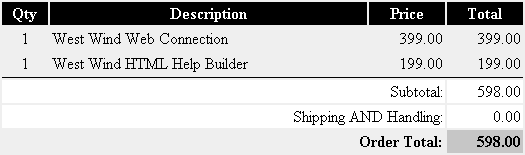
The .T. parameter caused the display to include the order totals. Without it you'd get just the lineitems. Using the different numeric values changes how the HTML is formatted. The Web version includes the HTML Form for changing quantities the GUI form output includes hotlinks to VFPS:// script code that can be captured in the WebBrowser control to edit and delete items.
On the Web what happens is that we set up our invoice, calculate it out, and then simply store the result from the HTMLLineItems method call into a string called pcShoppingCart which is embedded into the HTML template as <%= pcShoppingCart %>.
As a result of this the FrontPage document looks pretty much empty:

The shopping cart method is called directly from other 'action only' operations such as AddItem and RemoveItem. For example, here's the few lines of RemoveItem:
************************************************************************
* wwStore :: RemoveItem
*********************************
FUNCTION RemoveItem
LOCAL lcSKU, loTL, lnInvPk

lcSKU = Request.QueryString("Sku")

*** We assign an invoice id whenever we add an item
*** If no ID exists - no items are in the cart
lnInvPk = VAL( Session.GetSessionVar("InvoicePK") )
IF lnInvPK = 0
   THIS.ErrorMsg("The shopping cart is empty")
   RETURN
ENDIF

*** We can delete by sku because the app
*** summarizes all SKUs into a single item!
loTL = CREATE([WWS_CLASS_TLINEITEMS])
loTL.DeleteLineItem(lcSKU,lnInvPK)

*** Redisplay the shopping cart
THIS.ShoppingCart()

ENDFUNC
* wwStore :: RemoveItem
Notice that the business logic is called (DeleteLineItem()) and then another call is simply made to THIS.ShoppingCart to handle the display of the cart. Reusability principles apply here nicely because ShoppingCart is flexible enough to handle all the different access modes.
Placing the Order
You may hit the Shopping cart page multiple times if you're adding and removing a lot of items to your order. When it's time to check out you'll use the 'Place this Order' button on the top of the page. This button needs to be dynamic based on whether your server supports secure transactions using SSL or not.
This setting is controlled via an entry in the WebStore.ini file used for the Web application as part of the wwStoreConfig object. The lSecureOrderPage property is set either On or Off in the INI File and the link is adjusted accordingly.
Also, if you look at the FrontPage layout you see that the Place This Order Button is also dynamic - it's not displayed here. The reason for this is simple: You don't want to display it unless the shopping cart is not empty. A PRIVATE flag plNoItems is used to determine whether this order can be placed.
<%= IIF(plNoItems,[],[<td bgcolor="DarkBlue"  width=200 align="center"> <a href="] +
 Request.GetRelativeSecureLink("OrderProfile.wws",!Config.lSecureOrderPage) + [" class="ButtonLinks">
<b>Place this order</b></a></td>]) %>
Note that if plNoItems is True nothing is embedded. Otherwise a button is displayed and the GetRelativeSecureLink method of the Request object is used to turn the URL into a secure URL if requested.
Next: Placing the Order
